Your AI chat history, finally organized
Why Chaturai ?
Built for people who live inside AI chat and are tired of the mess.
One Sidebar, Every AI
Works inside ChatGPT, Gemini, Grok, and Claude. No extra tab, no copy-paste, no app switching.
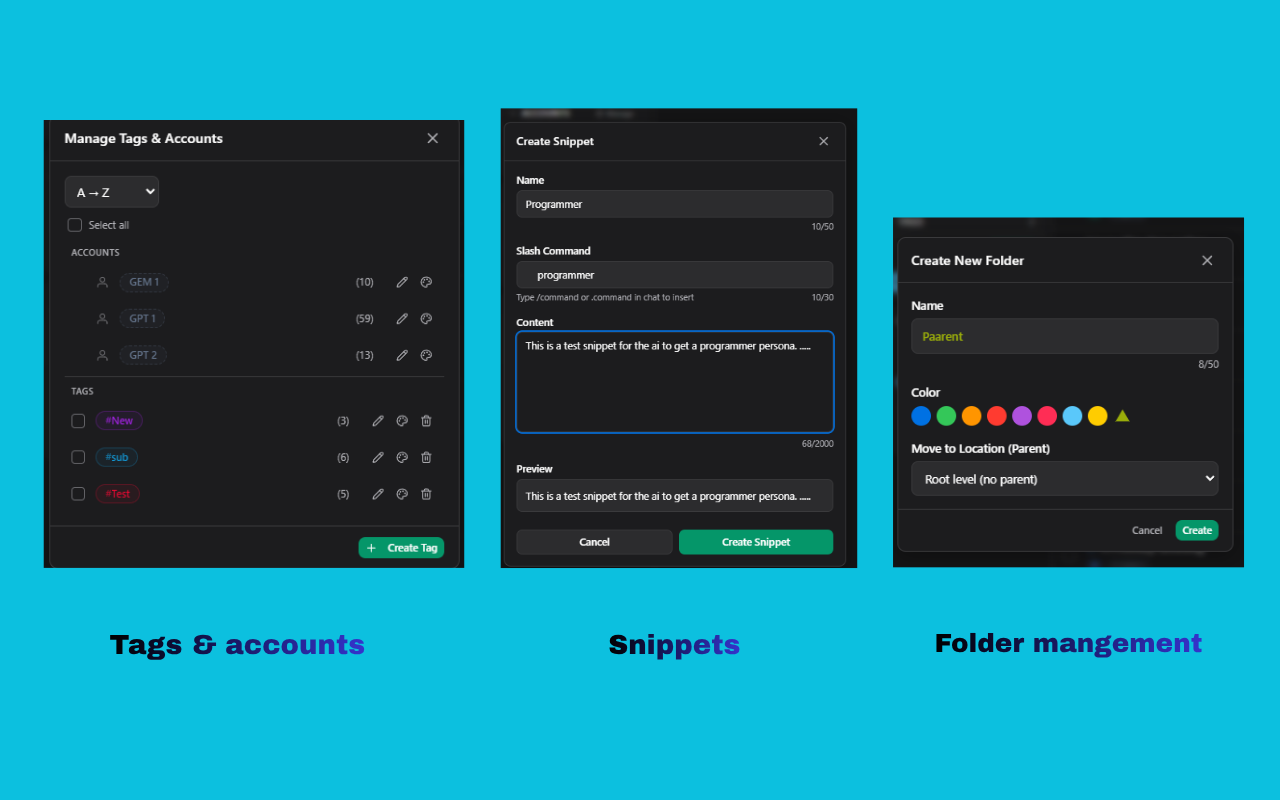
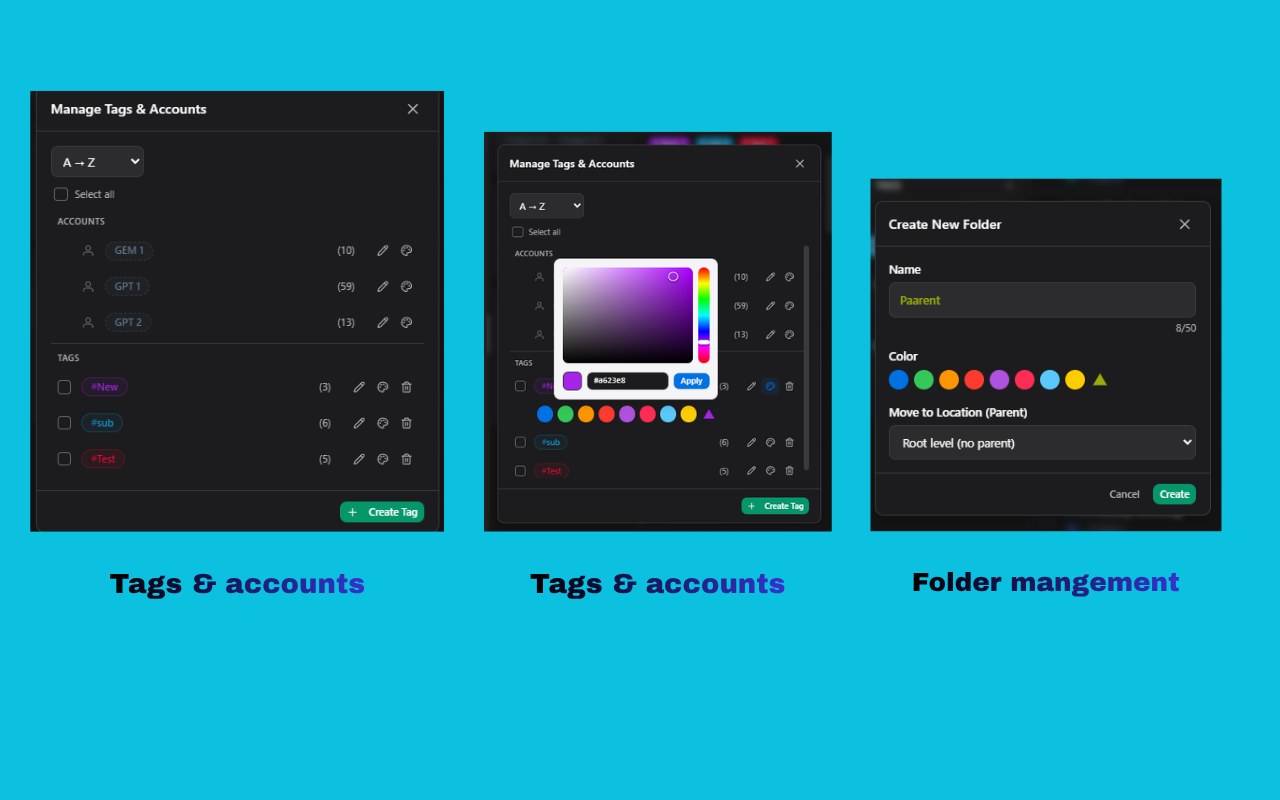
Folders & Tags
Nest folders three levels deep, tag chats with custom colours, and filter in a single click.
Slash-Command Snippets
Save your best prompts once. Trigger them anywhere with `/summarize`, `/rewrite`, or any command you invent.
Multi-Account Aware
Personal and work ChatGPT? Free and paid Grok? Chaturai auto-separates chats per account. No login needed.
Private by Design
We never read your messages, prompts, or AI responses. Only use metadata (titles, IDs, and timestamps). No login needed.
Cloud Backup
Back up your folders, tags, and snippets automatically. Restore on up to 4 devices with one sign-in.
Everything you need to tame AI chat
The features that matter, shown in detail.
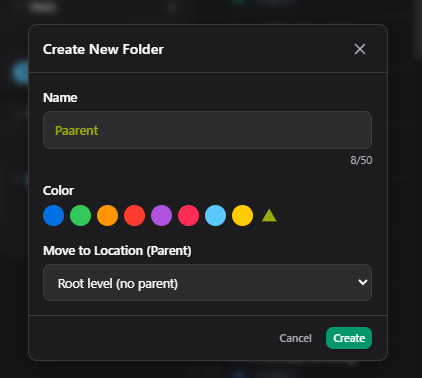
Folders & Tags That Keep Up
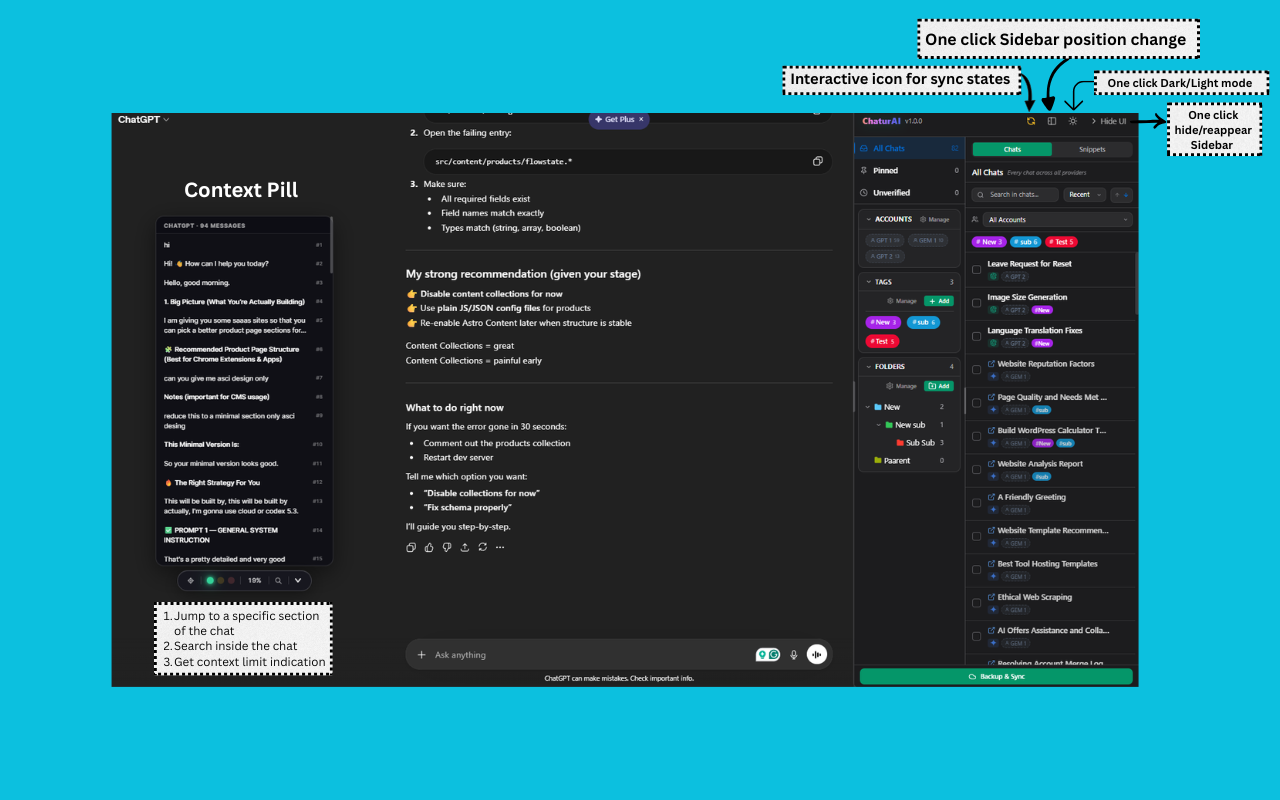
Drag any chat into a color-coded folder, nest folders up to three levels deep, and apply as many custom tags as you need. Filter by tag, folder, pinned, archived, or account in one click. Your chat list stops being a timeline and starts being a workspace.
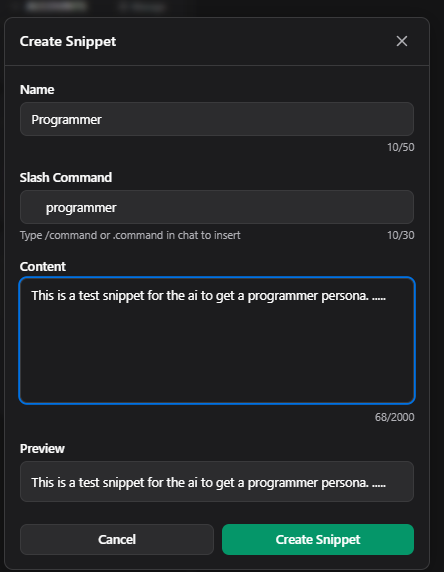
Snippets You Can Fire Anywhere
Save the prompts you reuse every day — briefs, rewrites, summaries, code reviews — and trigger them inside any AI chat box with a slash command. Works on ChatGPT, Gemini, Grok, and Claude. Build a personal library once; use it forever.
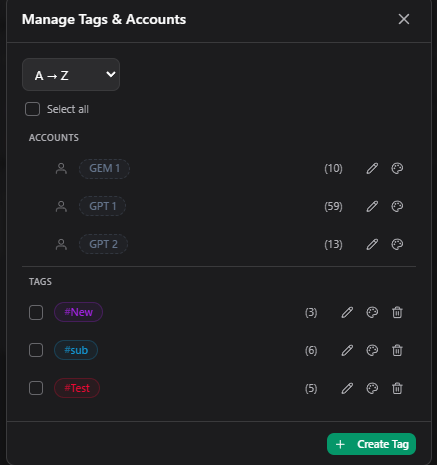
Multi-Account, Automatically
Chaturai detects when a chat belongs to a different provider account and groups it under a separate label. Switch between personal and work ChatGPT, free and paid Grok, or any combination — without manual sorting. Free plan supports one account per provider; Pro supports two.
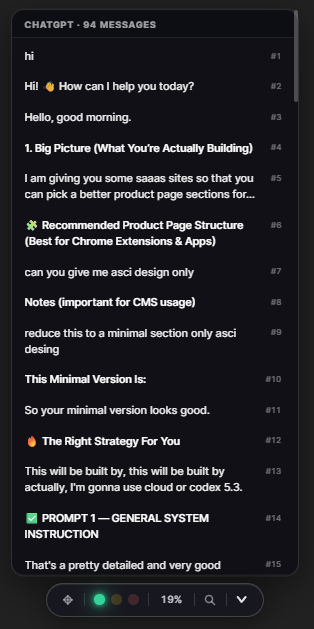
Fuzzy Search + Context Pill
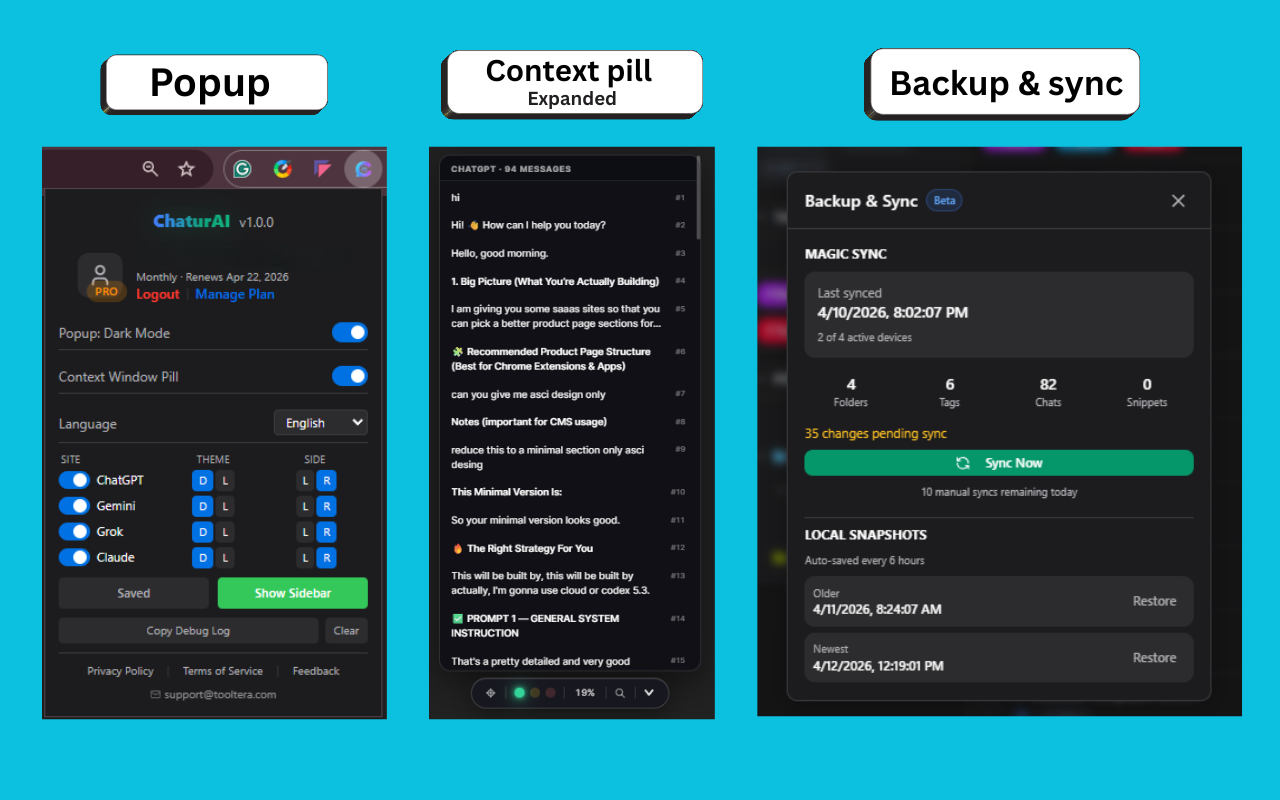
Find any chat in milliseconds with fuzzy, typo-tolerant search — even when you only remember half the title. The in-page context pill shows a live token estimate for your current conversation, so you always know when you're about to hit the limit. Both run 100% locally; nothing leaves your browser.
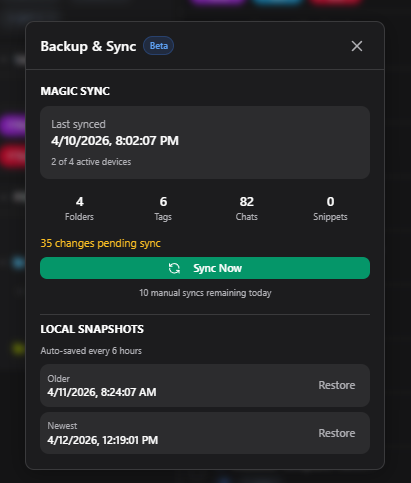
Auto Backup and Manual on Demand
Automatically backup every changes. Back up your folders, tags, and snippets automatically. Restore on up to 4 devices with one sign-in.
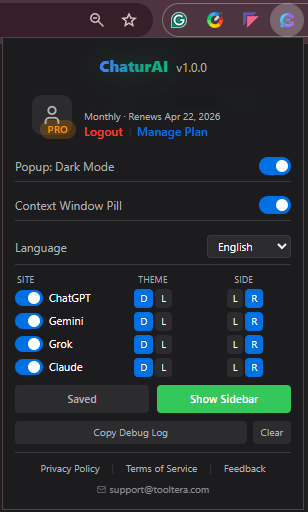
Popup with centralized control
Control everything from Popup.
Simple pricing, no surprises
Start free. Upgrade only when you outgrow the free plan.
Free
- Works on ChatGPT, Gemini, Grok, and Claude
- 1 account per provider
- 3 folders, 3 tags, 3 snippets
- Unlimited local chats
- Fuzzy search + context pill
- No account required
Pro Monthly
- Everything in Free
- 2 accounts per provider
- Unlimited folders, tags, and snippets
- Cloud backup across up to 4 devices
- Up to 20,000 chats backed up
- Priority email support
Pro Yearly
- Everything in Pro
- Same feature set — billed annually
- Unlimited folders, tags, and snippets
- Up to 20K chats backed up
- 2 accounts per provider
- Priority email support
See it in action
See Chaturai working live with AI provider sites.
Questions, answered
Can't find what you're looking for? Email [email protected].
Is Chaturai free?
Which AI platforms does it work with?
Does Chaturai read my chat messages?
Do I need an account to use it?
How does multi-account support work?
Is this real-time sync across devices?
What happens to my data if I uninstall?
Why does the extension ask for permissions on AI provider sites?
How do I cancel a paid plan?
Does it work with [other AI, e.g. Perplexity / Copilot]?
Legal Information
Read our Policies and service terms for Chaturai
Chaturai — Privacy Policy
Effective date: 11 April 2026
Last updated: 11 April 2026
1. Introduction
1.1 This Privacy Policy explains how Chaturai (the "Extension," "we," "us," or "our") collects, uses, stores, and discloses information when you install or use the Chaturai browser extension and related services.
1.2 Chaturai is operated as an individual project by the owner of tooltera.com, based in Bangladesh. References to "we" or "us" refer to the individual operator of Chaturai.
1.3 By installing or using Chaturai, you acknowledge that you have read and understood this Privacy Policy. If you do not agree with any part of it, you should uninstall the Extension and discontinue use.
2. Scope
2.1 This Privacy Policy applies to:
- a) the Chaturai browser extension;
- b) tooltera.com and any subdomains operated by us in connection with Chaturai;
- c) any communication between you and us in connection with the foregoing.
2.2 This Privacy Policy does not apply to third-party services you access through your browser, including but not limited to OpenAI (ChatGPT), Google (Gemini), xAI (Grok), and Anthropic (Claude). Your use of those services is governed by their own privacy policies.
3. What Chaturai Does and Does Not Access
3.1 What we access. Chaturai operates primarily inside your browser. From the supported AI provider pages (ChatGPT, Gemini, Grok, Claude), the Extension reads only the metadata required to organize your chats, specifically:
- a) chat titles as they appear in the provider's sidebar;
- b) chat identifiers (URLs and internal IDs used by the provider);
- c) timestamps (when a chat was created or last updated, where available);
- d) account identifiers used to distinguish between multiple logins on the same provider.
3.2 What we do NOT access or transmit. Chaturai does not read, collect, transmit, or store:
- a) the content of your conversations, messages, or prompts;
- b) AI-generated responses;
- c) files, images, or attachments you share with AI providers;
- d) your provider account credentials, passwords, or authentication tokens;
- e) any other content that is not strictly the organizational metadata described in Section 3.1.
3.3 Context Pill feature. Chaturai includes a "context pill" feature that provides a rough token-count estimate for your active conversation. This feature:
- a) runs entirely inside your browser;
- b) uses a heuristic (approximate) calculation, not an exact tokenizer;
- c) does not send message content to any server operated by us or any third party.
4. Information We Collect
4.1 Information you provide directly
- a) Account information (only if you create a Chaturai account for cloud sync): your email address and authentication credentials, handled by our authentication provider (see Section 6).
- b) Payment information (only if you purchase a paid plan): processed entirely by our payment processor, Lemon Squeezy. We do not receive or store your full payment-card details.
- c) Support correspondence: any information you voluntarily provide when you contact
[email protected].
4.2 Information generated by your use of the Extension
- a) Organizational data you create: folders, tags, snippets, and settings you configure inside Chaturai.
- b) Chat metadata (as defined in Section 3.1): stored locally in your browser's IndexedDB.
- c) Account fingerprints: a local-only grouping of chats by provider account, rebuilt from chat metadata on each sync.
4.3 Information collected automatically
- a) Anonymous usage analytics. We may use Google Analytics or a similar service to collect aggregated, anonymized usage data (e.g., number of active installations, feature usage counts) to improve the Extension. This data is not tied to your identity and is not combined with your account or chat metadata.
- b) Diagnostic logs. The Extension keeps a short-lived local debug log (24-hour retention) stored only in your browser. These logs are not transmitted unless you explicitly share them with us when requesting support.
4.4 Information we do NOT collect
We do not sell, rent, or monetize your data. We do not build advertising profiles. We do not track you across unrelated websites.
5. How We Use Information
5.1 We use the information described in Section 4 only to:
- a) provide, maintain, and improve the Extension;
- b) authenticate paid-plan users and enforce plan limits;
- c) synchronize your organizational data across devices, if you choose to enable cloud sync;
- d) process payments (via Lemon Squeezy);
- e) respond to your support requests;
- f) detect and prevent abuse, fraud, or security incidents;
- g) comply with applicable legal obligations.
5.2 We do not use your data for any purpose that would reasonably surprise a user who has read this Privacy Policy.
6. Third-Party Services
We rely on a small number of third parties to operate Chaturai. Each provider has its own privacy practices, which we encourage you to review.
# Provider Purpose Data shared 6.1 Supabase (Supabase Inc.) Authentication and cloud database for paid users Email, authentication token, organizational metadata (chats, folders, tags, snippets, settings) 6.2 Lemon Squeezy (Lemon Squeezy LLC) Payment processing, billing, tax handling (merchant of record) Email, payment details (handled directly by Lemon Squeezy) 6.3 GitHub (raw.githubusercontent.com) Fetching remote configuration and announcements (read-only, no user data sent) None — outbound read-only requests 6.4 Google Analytics (Google LLC), if enabled Aggregate, anonymized usage analytics Anonymized event data, no identifying user data6.5 We only share the minimum data necessary for each provider to perform its function. We do not share your data with any party except as described in this Policy or as required by applicable law.
7. Where Data Is Stored
7.1 Local data. Most data you create in Chaturai (folders, tags, snippets, chat metadata, settings) is stored only in your browser's local IndexedDB. It never leaves your device unless you enable cloud sync.
7.2 Cloud sync (paid users only). If you activate a paid plan and cloud sync, your organizational data is stored on Supabase infrastructure, which may be located outside Bangladesh. By enabling cloud sync, you consent to this cross-border storage.
7.3 Payment data is stored by Lemon Squeezy according to their own privacy policy and applicable laws.
8. Data Retention
8.1 Local data. Data stored in your browser remains until you uninstall the Extension, clear your browser data, or explicitly delete the records. We have no control over when local data is removed.
8.2 Cloud-synced data. Records you delete are marked as "tombstoned" for up to sixty (60) days on our cloud backend, after which they are permanently deleted. This retention window exists so that deletions propagate reliably across multiple devices.
8.3 Account deletion. To delete your Chaturai account and all associated cloud data, email [email protected] from the email address tied to your account. We will process your request within a reasonable time, typically within thirty (30) days, subject to legal obligations that require retention (e.g., tax records under Bangladesh law).
8.4 Backups. Routine operational backups may retain your data for a short additional period after account deletion; backups are overwritten on a rolling basis.
9. Security
9.1 We apply commercially reasonable technical and organizational measures to protect your information, including:
- a) HTTPS/TLS encryption for all network traffic between the Extension and our backend;
- b) Row-level security (RLS) on our cloud database, scoped per-user;
- c) Authentication tokens stored only in Chrome's secure extension storage (never in website
localStorage); - d) Limited employee/operator access on a need-to-know basis.
9.2 No method of transmission or storage is 100% secure. While we strive to protect your information, we cannot guarantee absolute security, and you provide information at your own risk.
10. Your Rights
10.1 We aim to comply with applicable data protection laws, including where applicable the EU General Data Protection Regulation (GDPR), the UK Data Protection Act, and the California Consumer Privacy Act (CCPA). If applicable law gives you rights regarding your personal data — such as rights to access, correct, delete, restrict processing, or port your data — you may exercise those rights by contacting [email protected].
10.2 We will respond to verifiable requests within a reasonable time and subject to the limits allowed by applicable law. We may need to verify your identity before acting on a request.
10.3 If you believe we have not handled your data appropriately, you may contact the data protection authority in your jurisdiction. We ask that you contact us first so we have the opportunity to resolve your concern.
11. Children
11.1 Chaturai is not directed at children under the age of thirteen (13).
11.2 If you are a resident of the European Economic Area, the United Kingdom, or another jurisdiction requiring a higher minimum age for digital services consent, you must be at least sixteen (16) years old to use Chaturai.
11.3 We do not knowingly collect personal information from children below the applicable minimum age. If you believe a child has provided us information, contact [email protected] and we will take appropriate steps to delete it.
12. Changes to This Policy
12.1 We may update this Privacy Policy from time to time. The "Last updated" date at the top of this document reflects the latest revision.
12.2 Material changes will be communicated through the Extension, by email (where reasonably practicable), or by posting a notice on tooltera.com. Continued use of the Extension after changes take effect constitutes acceptance of the updated Policy.
13. Contact
For any question, concern, or request related to this Privacy Policy or your data:
- Email:
[email protected] - Website: tooltera.com
This Privacy Policy is provided in good faith to describe Chaturai's current practices. It does not create any contractual obligation beyond what is required by applicable law.